

Smart Doors
Makes doors smarter. Allows doors to synchronize across multiple scenes and sends chat messages when players try to open locked doors (and also tells you which of the doors).
Installation
It's always easiest to install modules from the in game add-on browser.
To install this module manually:
- Inside the Foundry "Configuration and Setup" screen, click "Add-on Modules"
- Click "Install Module"
- In the "Manifest URL" field, paste the following url:
https://raw.githubusercontent.com/manuelVo/foundryvtt-smart-doors/master/src/module.json - Click 'Install' and wait for installation to complete
- Don't forget to enable the module in game using the "Manage Module" button
libWrapper
This module uses the libWrapper library for wrapping core methods. It is a hard dependency and it is recommended for the best experience and compatibility with other modules.
Feature overview
Consistent Door Control Size
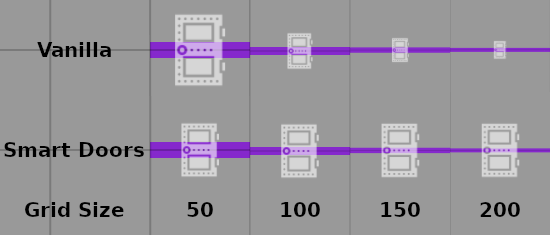
Door Control icons will be rendered the same size in every scene, regardless of the configured grid size. The size of the icons is configurable.
Door Control Outline
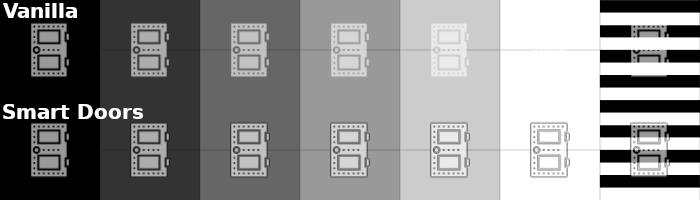
Door Control icons will be rendered with an outline to improve their visibility on bright backgrounds.
Tint Secret Doors
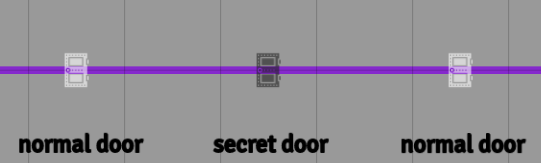
Which where the secret doors again? This tints all secret doors grey in the GM view, allowing to easily differentiate between normal and secret doors.
Toggle Secret Doors

Easily reveal secret doors to players. Ctrl+left click secrets doors to turn them into regular doors. Ctrl+left click can also be done on normal doors to turn them into secret doors. Using this in combination with Tint Secret Doors is recommended so you can actually see what you are doing.
Locked Door Alerts

Keep everyone informed who tried to open which door. Whenever a player tries to open a door that is locked, a chat message stating that fact will be sent to all players. Additionally the door locked sound will be played for everyone. When the chat message is hovered with the mouse, the door that the player tried to open will be highlighted.
If the GM tries to open a locked door the sound will only played for him and no chat message will be sent.
Synchronized Doors

Keep multiple doors in sync - even across different scenes. Example use cases:
- A tavern has an outdoor and an indoor scene. If a player opens the entrance door on the outdoor map, the entrance door in the indoor map will be opened as well
- An ancient trap that opens the cell of a monster once the door to the treasury is opened.
Usage
To set up door synchronization, assign all doors that should be synchronized to the same Synchronization Group. The Synchronization Group can be any text. Doors that have the same Synchronization Group set will be synchronized. This will work across different scenes. At least two doors must be assigned to the same Synchronization Group. If only a single door is assigned to a synchronization group it will behave as any other normal door.
Once a Synchronization Group is set up for multiple doors, simply open/close/lock/unlock one of the doors to achieve the same effect on other doors as well.
Features ideas
- Attach macros to doors that are being executed when the door is being opened/closed
- Give out keys to players, that allow them to lock/unlock associated doors
- Doors that can only be seen from one side when closed
- Only allow doors to be opened of the character is near
- Doors that can only be opened from one side
Issues
Any issues, bugs, or feature requests are always welcome to be reported directly to the Issue Tracker, or using the Bug Reporter Module.
Acknowledgements
Bootstrapped with League of Extraordinary FoundryVTT Developers foundry-vtt-types.
Mad props to the 'League of Extraordinary FoundryVTT Developers' community which helped me figure out a lot.